


Ensemble Designs BEM-1-H BrightEye Mitto (New)
Price via quote
3G/HD/SD Scan Converter with optional HDCP (Waiver Needed to Issue HDCP License)
Select Condition

Ensemble Designs BEM-1-H BrightEye Mitto (New)
3G/HD/SD Scan Converter with optional HDCP (Waiver Needed to Issue HDCP License)
The BrightEye Mitto 3G/HD/SD Scan Converter from Ensemble Designs allows you to scale video, particularly video taken from the web that needs to be output for broadcast applications. It accepts DVI or VGA signals and can output SD-, HD-, or 3G-SDI. HDMI input is also possible with use of an adapter. The unit also supports analog audio and AES digital audio input.
Features
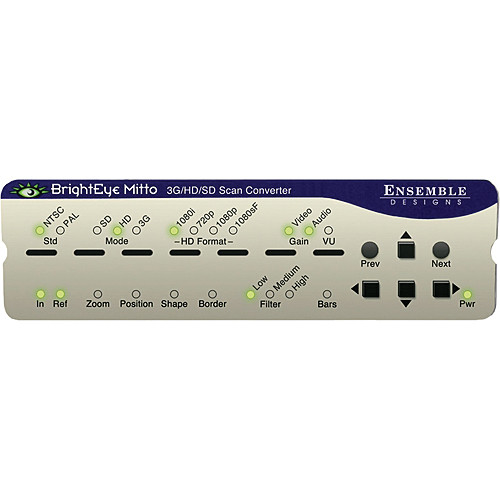
It offers PC and Mac interfaces. You can choose what part of the video to output with your mouse. The unit can additionally be controlled via its front-panel buttons or RS-232. Other features include user-selectable video output format, genlock, proprietary scaling, and presets. The unit's small footprint makes it well suited for use in virtually any work environment.
Web Video to Air Made Simple
This device supports SD, HD, and 3G video signals. For broadcasters who find they are relying on video content from the web, BrightEye Mitto offers the ability to convert web video for use in broadcast applications.
Filtering & Scaling Technology
BrightEye Mitto offers a proprietary scaling technology and multi-tap filtering. The region selected for output determines if Mitto acts as an upconverter or downconverter. The filters automatically adjust in accordance with the conversion being performed. Bringing progressive images from the desktop into the interlaced world of video is often a compromise between sharp details versus interfield flicker. Mitto's advanced filtering is designed to satisfy both of these seemingly contradictory requirements.
Digital & Analog Video and Audio
The front-panel interface allows you to choose the desired video output format. Choices are 1.5 and 3Gbps HD-SDI and SD-SDI. Composite video is simultaneously output on a separate BNC connector. The genlock reference input allows the video outputs to be timed to house. The audio input accepts either AES digital audio or analog audio. Audio is embedded into the SDI outputs, which is required for many high-end applications.
User Interface
The included Mac/PC application let's you simply use your mouse to click and drag over the specific portion of computer video that you want to output. The interface allows you to see which parts of the screen you don't want to output, as well as the parts you do want to use. The perspective of seeing the whole screen gives you the ability to choose exactly which portion of the video you want to output. Whether you output the entire screen of just a selected portion, you'll be able to see exactly what you are doing. Presets also enable you to store your favorite settings.
Free Software Upgrades Forever
BrightEye Mitto's software can be upgraded through the unit's USB port. Software upgrades are available for no charge for the life of the product and are conveniently downloadable from the Ensemble Designs web site.
No technical specifications available for this model
USER MANUAL
No user manual available for download